read
Introduction
A sign-in page is an elementary element of most applications, where the user must sign-in to use most of the application’s features. Therefore, this component of an application was created below.
Preview
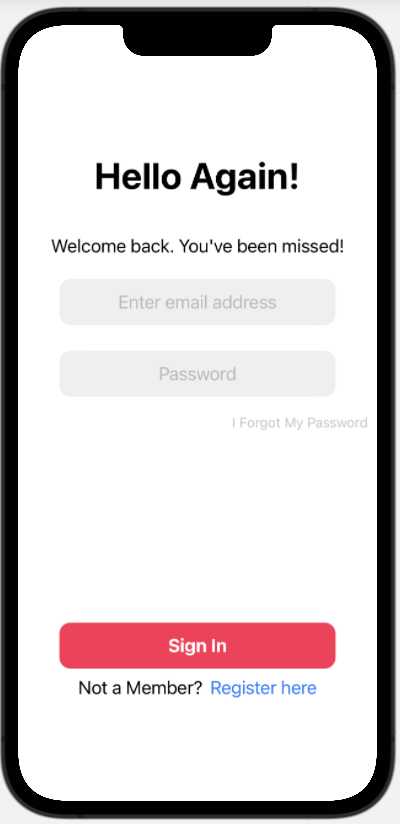
As shown above, the sign-in page consists of the following:
- A bolded title text
- Smaller description text
- Text cell for email address
- Text cell for password
- Sign In Button
- Register
struct SignInView: View {
    @State var id: String = "" // 1. The input string is defined
    @State var pw: String = "" // 2. Same with passwords
    var body: some View {
        VStack{
            TextField("Enter email address", text: $id)
            // 3. A TextField is a type of control that shows an editable text interface.
                .multilineTextAlignment(.center)
                .font(.system(size: 20))
                .frame(width: 300, height: 50, alignment: .center)
                .background(Color(.sRGB, red: 239/255, green: 239/255, blue: 239/255))
                .cornerRadius(12)
                .padding(.bottom, 20)

            TextField("Password", text: $pw)
                .multilineTextAlignment(.center)
                .font(.system(size: 20))
                .frame(width: 300, height: 50, alignment: .center)
                .background(Color(.sRGB, red: 239/255, green: 239/255, blue: 239/255))
                .cornerRadius(12)
        }
    }
}
Apart from the previously used elements, a new element called textfield was introduced, which allows input of text along with adding a visual for the user.